1. File类的理解
- File类位于
java.io包下,本章中涉及到的相关流也都声明在java.io包下。 - File类的一个对象,对应于操作系统下的一个文件或一个文件目录(或文件夹)。
- File类中声明了新建、删除、获取名称、重命名等方法,并没有涉及到文件内容的读写操作。要想实现文件内容的读写,我们就需要使用IO流。
- File类的对象,通常是作为IO流操作的文件的端点出现的。
- 代码层面,将File类的对象作为参数传递到IO相关类的构造器中。
2. 内部API使用说明
2.1 构造器
public File(String pathname):以pathname为路径创建File对象,可以是绝对路径或者相对路径。public File(String parent, String child):以parent为父路径,child为子路径创建File对象。public File(File parent, String child):根据一个父File对象和子文件路径创建File对象。
import java.io.File;

public class FileTest
{
    File file1 = new File("C://");
    File file2 = new File("abc");

    //在idea中,相对路径是module
    //main方法相对路径是project
    File file3 = new File("abc","a.txt");
    //参数2可以是文件或目录
}
以下是一些常用的File类方法及其功能:
获取名称:
- java
public String getName()
返回文件或目录的名称。
获取路径:
- java
public String getPath()
返回文件或目录的路径。
获取绝对路径:
- java
public String getAbsolutePath()
返回文件或目录的绝对路径。
获取绝对路径表示的文件:
- java
public File getAbsoluteFile()
返回文件或目录的绝对路径表示的文件对象。
获取上层文件目录路径:
- java
public String getParent()
返回上层文件目录路径。若无,返回null。
获取文件长度:
- java
public long length()
返回文件的长度(即字节数)。不能获取目录的长度。
获取最后一次的修改时间:
- java
public long lastModified()
返回文件最后一次的修改时间,单位为毫秒。
判断文件或目录是否实际存在:
- java
public boolean exists()
返回此File表示的文件或目录是否实际存在。
判断是否为目录:
- java
public boolean isDirectory()
返回此File表示的是否为目录。
判断是否为文件:
- java
public boolean isFile()
返回此File表示的是否为文件。
判断是否可读:
- java
public boolean canRead()
返回此File是否可读。
判断是否可写:
- java
public boolean canWrite()
返回此File是否可写。
判断是否隐藏:
- java
public boolean isHidden()
返回此File是否隐藏。
import java.io.File;
import java.io.IOException;
import org.junit.Test;

public class FileTest {

    @Test
    public void test6() throws IOException {
        File file1 = new File("d:\\lio\\hello.txt");

        if (!file1.exists()) {
            boolean isSuccessed = file1.createNewFile();
            if (isSuccessed) {
                System.out.println("创建成功");
            } else {
                System.out.println("文件创建失败");
            }
        } else {
            System.out.println("此文件已存在");
            System.out.println(file1.delete() ? "文件删除成功" : "文件删除失败");
        }
    }
}
import java.io.File;
import org.junit.Test;

public class FileTest {

    @Test
    public void test8() {
        // 前提: d:\\io 文件目录存在,io2 或 io3 目录是不存在的。
        File file1 = new File("d:\\io\\io2\\i04");
        System.out.println(file1.mkdir()); // false

        File file2 = new File("d:\\io\\io3\\io5");
        System.out.println(file2.mkdirs()); // true
    }
}
import java.io.File;
import org.junit.Test;

public class Exer2 {
    /*
    * 判断指定目录下是否有后缀名为.jpg的文件,如果有,就输出该文件名称
    * */
    @Test
    public void test1() {
        File dir = new File("F:\\10-图片");
        String[] listFiles = dir.list();
        if (listFiles != null) {
            for (String s : listFiles) {
                if (s.endsWith(".jpg")) {
                    System.out.println(s);
                }
            }
        }
    }
}
import java.io.File;

public class Exer2 {
    /*
    * 删除指定目录及其子目录和文件
    * */
    public void deleteDirectory(File file) {
        // 如果file是文件,直接删除
        if (file.isFile()) {
            file.delete();
        } else if (file.isDirectory()) {
            // 如果file是目录,先把它的下一级干掉,然后删除自己
            File[] all = file.listFiles();
            if (all != null) {
                // 循环删除的是file的下一级
                for (File f : all) {
                    // f代表file的每一个下级
                    deleteDirectory(f);
                }
            }
            // 删除自己
            file.delete();
        }
    }
}
I/O流的分类
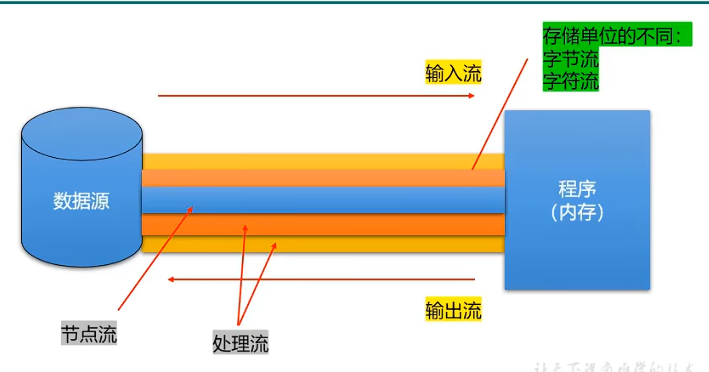
- 流向的不同:
- 输入流 (Input Stream)
- 输出流 (Output Stream)
- 处理单位的不同:
- 字节流 (Byte Stream)
- 字符流 (Character Stream)
- 流的角色的不同:
- 节点流 (Node Stream)
- 处理流 (Processing Stream)
基础I/O流的框架
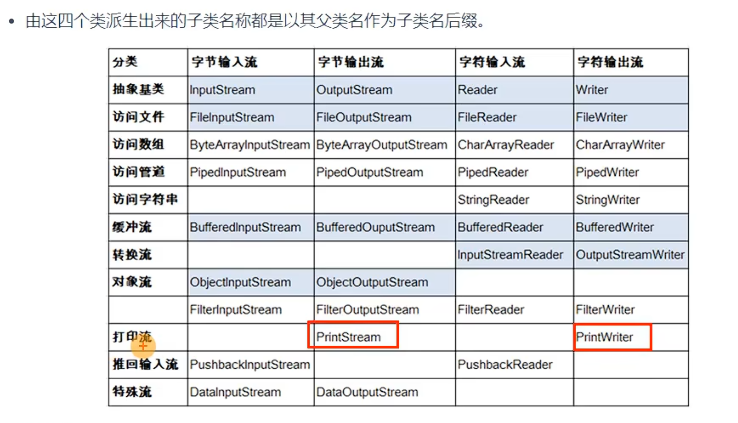
- 抽象基类:
InputStreamOutputStreamReaderWriter
- 4个节点流 (也称为文件流):
FileInputStreamFileOutputStreamFileReaderFileWriter
PS 本章设计的流有很多,但是使用流来读写是非常规范的
FileReader 和 FileWriter 的使用
3.1 执行步骤
- 创建读取或写出的 File 类的对象
- 创建输入流或输出流
- 具体的读入或写出的过程
- 读入:
read(char[] cbuffer) - 写出:
write(String str)/write(char[] cbuffer, 0, len)
- 读入:
- 关闭流资源,避免内存泄漏
3.2 注意点
- 因为涉及到流资源的关闭操作,所以出现异常的话,需要使用
try-catch-finally的方式来处理异常。 - 对于输入流来讲,要求 File 类的对象对应的物理磁盘上的文件必须存在。否则,会报
FileNotFoundException。- 对于输出流来讲,File 类的对象对应的物理磁盘上的文件可以不存在。
- 如果此文件不存在,则在输出的过程中,会自动创建此文件,并写出数据到此文件中。
- 如果此文件存在,使用
FileWriter(File file)或FileWriter(File file, false):输出数据。
- 对于输出流来讲,File 类的对象对应的物理磁盘上的文件可以不存在。
Here's a simple example to illustrate the usage of FileReader and FileWriter:
java
import java.io.File;
import java.io.FileReader;
import java.io.FileWriter;
import java.io.IOException;

public class FileReaderWriterExample {
    public static void main(String[] args) {
        // 创建 File 类的对象
        File inputFile = new File("input.txt");
        File outputFile = new File("output.txt");

        // 创建 FileReader 和 FileWriter 对象
        try (FileReader fr = new FileReader(inputFile); FileWriter fw = new FileWriter(outputFile)) {
            // 读入和写出的过程
            char[] buffer = new char[1024];
            int length;
            while ((length = fr.read(buffer)) != -1) {
                fw.write(buffer, 0, length);
            }
        } catch (IOException e) {
            e.printStackTrace();
        }
    }
}
输入流 读取文件
import java.io.File;
import java.io.FileReader;
import java.io.FileNotFoundException;
import java.io.IOException;

public class FileRaderWriteTest {
    public static void main(String[] args) {
        // 1. 创建File类的对象,对应着hello.txt文件
        File file = new File("hello.txt");

        // 2. 创建输入型的字符流,用于读取数据
        try (FileReader fr = new FileReader(file)) {
            // 3. 读取数据,并显示在控制台上
            int ch;
            while ((ch = fr.read()) != -1) {
                System.out.print((char) ch);
            }
        } catch (FileNotFoundException e) {
            System.out.println("文件未找到: " + e.getMessage());
        } catch (IOException e) {
            System.out.println("读取文件时发生错误: " + e.getMessage());
        }
        //4,流资源的关闭操作(必须关闭,否则会造成内存泄露)
    }
}
输出流 写入文件
class FileWrite{
    public static void main(String[] args) {
        //创建File类对象,指明要写出的文件名称
        File file = new File("z.txt");
        //创建输出流
        try {
            FileWriter fw = new FileWriter(file);
            //写出
            //FileWriter fw = new FileWriter(file,true); 追加
            fw.write("hello");
            //关闭
            fw.close();

        } catch (IOException e) {
            throw new RuntimeException(e);
        }
    }
}
public class ReaderWriterTest {
    public static void main(String[] args) {
        File in = new File("z.txt");
        File out = new File("z-copy.txt");

        // 创建输入输出流
        try (FileReader fr = new FileReader(in);
             FileWriter fw = new FileWriter(out)) {

            // 读取数据并写入
            int ch;
            while ((ch = fr.read()) != -1) {
                fw.write(ch);
            }

            System.out.println("文件复制成功!");
        } catch (FileNotFoundException e) {
            System.out.println("文件未找到: " + e.getMessage());
        } catch (IOException e) {
            System.out.println("读取或写入文件时发生错误: " + e.getMessage());
        }
    }
}
操作图片,视频等文件时不适合使用字符流,应该考虑使用字节流
class FileCopy {
    public static void main(String[] args) {
        // 1. 创建相关的File类的对象
        File srcFile = new File("playgirl.jpg");
        File destFile = new File("playgirl_copy.jpg");

        // 2. 创建相关的字节流
        try (FileInputStream fis = new FileInputStream(srcFile);
             FileOutputStream fos = new FileOutputStream(destFile)) {

            // 3. 数据的读入和写出
            byte[] buffer = new byte[1024]; // 1kb buffer
            int length;
            while ((length = fis.read(buffer)) != -1) {
                fos.write(buffer, 0, length);
            }

            System.out.println("copy成功!");

        } catch (IOException e) {
            e.printStackTrace();
        }
    }
}
class Test3 {
    public static void main(String[] args) {
        FileInputStream fis = null;
        try {
            // 1. 创建相关的File类的对象
            File srcFile = new File("hello.txt");

            // 2. 创建相关的字节流
            fis = new FileInputStream(srcFile);

            // 3. 数据的读入和写出
            byte[] buffer = new byte[5];
            int len; // 记录每次读入到buffer中字节的个数
            while ((len = fis.read(buffer)) != -1) {
                String str = new String(buffer, 0, len);
                System.out.print(str);
            }
            System.out.println("复制成功");

        } catch (IOException e) {
            e.printStackTrace();
        } finally {
            // 4. 关闭流资源,避免内存泄漏
            if (fis != null) {
                try {
                    fis.close();
                } catch (IOException e) {
                    e.printStackTrace();
                }
            }
        }
    }
}
输出乱码 hello中��
原因 总共 19 字节 复制“国”字时不匹配
字符流和字节流的注意点
4.2 注意点
- 字符流:
- 只能用来操作文本文件,不能用来处理非文本文件。
- 适用于
.txt、.java、.c、.cpp、.py等文件。
- 字节流:
- 通常用来处理非文本文件。
- 适用于
.doc、.xls、.jpg、.pdf、.mp3、.mp4、.avi等文件。 - 如果涉及到文本文件的复制操作,也可以使用字节流。
import java.io.File;
import java.io.FileInputStream;
import java.io.FileOutputStream;
import java.io.IOException;

public class FileCopyExample {
    public static void main(String[] args) {
        FileInputStream fis = null;
        FileOutputStream fos = null;
        try {
            // 1. 创建相关的File类的对象
            File srcFile = new File("hello.txt");
            File destFile = new File("hello_copy.txt");

            // 2. 创建相关的字节流
            fis = new FileInputStream(srcFile);
            fos = new FileOutputStream(destFile);

            // 3. 数据的读入和写出
            byte[] buffer = new byte[1024]; // 1kb buffer
            int len;
            while ((len = fis.read(buffer)) != -1) {
                fos.write(buffer, 0, len);
            }

            System.out.println("复制成功");

        } catch (IOException e) {
            e.printStackTrace();
        } finally {
            // 4. 关闭流资源,避免内存泄漏
            if (fis != null) {
                try {
                    fis.close();
                } catch (IOException e) {
                    e.printStackTrace();
                }
            }
            if (fos != null) {
                try {
                    fos.close();
                } catch (IOException e) {
                    e.printStackTrace();
                }
            }
        }
    }
}
缓冲流的作用
缓冲流的主要作用是提升文件读写的效率。以下是4个常用的缓冲流及其使用方法:
处理非文本文件的字节流
- BufferedInputStream
- 用于提高读取字节流的效率。
- 使用方法:
read(byte[] buffer)
- BufferedOutputStream
- 用于提高写入字节流的效率。
- 使用方法:
write(byte[] buffer, 0, len)
处理文本文件的字符流
- BufferedReader
- 用于提高读取字符流的效率。
- 使用方法:
read(char[] cbuf)
- BufferedWriter
- 用于提高写入字符流的效率。
- 使用方法:
write(char[] cbuf, 0, len)
示例代码
以下是使用缓冲流进行文件复制的示例代码:
java
import java.io.*;

public class BufferedStreamExample {
    public static void main(String[] args) {
        // 处理非文本文件的字节流
        try (BufferedInputStream bis = new BufferedInputStream(new FileInputStream("source.jpg"));
             BufferedOutputStream bos = new BufferedOutputStream(new FileOutputStream("destination.jpg"))) {

            byte[] buffer = new byte[1024];
            int len;
            while ((len = bis.read(buffer)) != -1) {
                bos.write(buffer, 0, len);
            }
            System.out.println("字节流文件复制成功");

        } catch (IOException e) {
            e.printStackTrace();
        }

        // 处理文本文件的字符流
        try (BufferedReader br = new BufferedReader(new FileReader("source.txt"));
             BufferedWriter bw = new BufferedWriter(new FileWriter("destination.txt"))) {

            char[] cbuf = new char[1024];
            int len;
            while ((len = br.read(cbuf)) != -1) {
                bw.write(cbuf, 0, len);
            }
            System.out.println("字符流文件复制成功");

        } catch (IOException e) {
            e.printStackTrace();
        }
    }
}
关闭资源时先关外层,以及由于外层流的关闭也会关闭内层流,所以内层流关闭操作可以省略
缓冲流默认 8kb 8*1024
readLine() 每次返回一行数据,返回的数据不包含换行
flush() 每次调用时会主动将内存数据写入磁盘,可用于关闭时保留数据或实时写入场景
字符编码与解码
字符编码:将字符、字符串、字符数组转换为字节、字节数组(从我们能看得懂的转换为我们看不懂的)。
字符解码:将字节、字节数组转换为字符、字符串、字符数组(从我们看不懂的转换为我们能看得懂的)。
避免乱码的注意事项
为了确保程序在读取文本文件时不出现乱码,需要注意以下几点:
- 编码与解码字符集一致:
- 解码时使用的字符集必须与当初编码时使用的字符集相同。例如,如果文件是用UTF-8编码的,那么读取时也必须使用UTF-8解码。
- 常见字符集:
- UTF-8:一种变长的字符编码,可以表示所有的Unicode字符,广泛用于网络传输和文件存储。
- ISO-8859-1:一种单字节字符编码,主要用于西欧语言。
- GBK:一种双字节字符编码,主要用于简体中文。
示例代码
以下是一个使用指定字符集进行文件读写的示例代码:
java
import java.io.*;

public class EncodingExample {
    public static void main(String[] args) {
        // 写入文件时使用UTF-8编码
        try (BufferedWriter writer = new BufferedWriter(new OutputStreamWriter(new FileOutputStream("example.txt"), "UTF-8"))) {
            writer.write("这是一个测试文本。");
        } catch (IOException e) {
            e.printStackTrace();
        }

        // 读取文件时使用UTF-8解码
        try (BufferedReader reader = new BufferedReader(new InputStreamReader(new FileInputStream("example.txt"), "UTF-8"))) {
            String line;
            while ((line = reader.readLine()) != null) {
                System.out.println(line);
            }
        } catch (IOException e) {
            e.printStackTrace();
        }
    }
}
}
import java.io.File;
import java.io.FileInputStream;
import java.io.IOException;
import java.io.InputStreamReader;

public class Test4 {
    public static void main(String[] args) {
        FileInputStream fis = null;
        InputStreamReader isr = null;
        try {
            // 创建相关的File类的对象
            File file1 = new File("dbcp_utf-8.txt");

            // 创建相关的字节流
            fis = new FileInputStream(file1);

            isr = new InputStreamReader(fis);
            // 使用IDEA默认的UTF-8字符集
            //isr = new InputStreamReader(fis, "UTF-8");

            // 读入操作
            char[] cBuffer = new char[1024];
            int len;
            while ((len = isr.read(cBuffer)) != -1) {
                String str = new String(cBuffer, 0, len);
                System.out.print(str);
            }
            System.out.println("读取成功");

        } catch (IOException e) {
            e.printStackTrace();
        } finally {
            // 关闭资源,避免内存泄漏
            if (isr != null) {
                try {
                    isr.close();
                } catch (IOException e) {
                    e.printStackTrace();
                }
            }
            if (fis != null) {
                try {
                    fis.close();
                } catch (IOException e) {
                    e.printStackTrace();
                }
            }
        }
    }
}
更改文件编码
import java.io.File;
import java.io.FileInputStream;
import java.io.FileOutputStream;
import java.io.IOException;
import java.io.InputStreamReader;
import java.io.OutputStreamWriter;

public class EncodingConversionExample {
    public static void main(String[] args) {
        FileInputStream fis = null;
        InputStreamReader isr = null;
        FileOutputStream fos = null;
        OutputStreamWriter oos = null;
        try {
            // 1. 创建相关的File类的对象
            File file1 = new File("dbcp_gbk.txt");
            File file2 = new File("dbcp_gbk_to_utf8.txt");

            // 2. 创建相关的字节流
            fis = new FileInputStream(file1);
            // 参数2对应的是解码集,必须与dbcp_gbk.txt的编码集一致。
            isr = new InputStreamReader(fis, "GBK");
            fos = new FileOutputStream(file2);
            // 参数2指明内存中的字符存储到文件中的字节过程中使用的编码集。
            oos = new OutputStreamWriter(fos, "UTF-8");

            // 3. 读写过程
            char[] cBuffer = new char[1024];
            int len;
            while ((len = isr.read(cBuffer)) != -1) {
                oos.write(cBuffer, 0, len);
            }
            System.out.println("转换成功");

        } catch (IOException e) {
            e.printStackTrace();
        } finally {
            // 4. 关闭流资源,避免内存泄漏
            if (oos != null) {
                try {
                    oos.close();
                } catch (IOException e) {
                    e.printStackTrace();
                }
            }
            if (fos != null) {
                try {
                    fos.close();
                } catch (IOException e) {
                    e.printStackTrace();
                }
            }
            if (isr != null) {
                try {
                    isr.close();
                } catch (IOException e) {
                    e.printStackTrace();
                }
            }
            if (fis != null) {
                try {
                    fis.close();
                } catch (IOException e) {
                    e.printStackTrace();
                }
            }
        }
    }
}
在内存中时,无论中英文都是两个字节(Unicode 字符集),在文件中使用其它编码
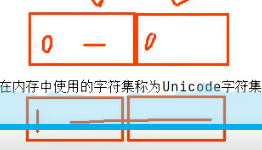
开头为 0 则单字节
开头为 1 多个连起来
所以需要多占用字节
在存储的文件中的字符
- ASCII:
- 主要用来存储a、b、c等英文字符和1、2、3、常用的标点符号。
- 每个字符占用1个字节。
- ISO-8859-1:
- 每个字符占用1个字节。
- 向下兼容ASCII。
- GBK:
- 用来存储中文简体繁体、a、b、c等英文字符和1、2、3、常用的标点符号等字符。
- 中文字符使用2个字节存储。
- 向下兼容ASCII,意味着英文字符、1、2、3、标点符号仍使用1个字节。
- UTF-8:
- 可以用来存储世界范围内主要的语言的所有字符。
- 使用1-4个不等的字节表示一个字符。
- 中文字符使用3个字节存储。
- 向下兼容ASCII,意味着英文字符、1、2、3、标点符号仍使用1个字节。
DataOutputStream 和 DataInputStream
DataOutputStream:
- 可以将内存中的基本数据类型的变量、String类型的变量写出到具体的文件中。
DataInputStream:
- 将文件中保存的数据还原为内存中的基本数据类型的变量、String类型的变量。
对象流及其作用
2.1 API
ObjectInputStreamObjectOutputStream
2.2 作用
- 可以读写基本数据类型的变量、引用数据类型的变量。
对象的序列化机制
对象序列化机制允许把内存中的Java对象转换成平台无关的二进制流,从而允许把这种二进制流持久地保存在磁盘上,或通过网络将这种二进制流传输到另一个网络节点。当其它程序获取了这种二进制流,就可以恢复成原来的Java对象。
示例代码
以下是使用对象流进行对象序列化和反序列化的示例代码:
java
import java.io.*;

class Person implements Serializable {
    private static final long serialVersionUID = 1L;
    private String name;
    private int age;

    public Person(String name, int age) {
        this.name = name;
        this.age = age;
    }

    @Override
    public String toString() {
        return "Person{name='" + name + "', age=" + age + "}";
    }
}

public class ObjectStreamExample {
    public static void main(String[] args) {
        // 序列化对象
        try (ObjectOutputStream oos = new ObjectOutputStream(new FileOutputStream("person.dat"))) {
            Person person = new Person("Alice", 30);
            oos.writeObject(person);
            System.out.println("对象序列化成功");
        } catch (IOException e) {
            e.printStackTrace();
        }

        // 反序列化对象
        try (ObjectInputStream ois = new ObjectInputStream(new FileInputStream("person.dat"))) {
            Person person = (Person) ois.readObject();
            System.out.println("对象反序列化成功: " + person);
        } catch (IOException | ClassNotFoundException e) {
            e.printStackTrace();
        }
    }
}
对象的序列化机制
对象序列化机制允许把内存中的Java对象转换成平台无关的二进制流,从而允许把这种二进制流持久地保存在磁盘上,或通过网络将这种二进制流传输到另一个网络节点。当其它程序获取了这种二进制流,就可以恢复成原来的Java对象。
使用的流
- 序列化过程:
- 使用
ObjectOutputStream流实现。 - 将内存中的Java对象保存在文件中或通过网络传输出去。
- 使用
- 反序列化过程:
- 使用
ObjectInputStream流实现。 - 将文件中的数据或网络传输过来的数据还原为内存中的Java对象。
- 使用
自定义类要想实现序列化机制,需要满足以下条件:
- 实现
Serializable接口:- 自定义类必须实现
java.io.Serializable接口。 - 该接口是一个标记接口,不包含任何方法。
- 自定义类必须实现
- **提供一个 **
serialVersionUID:- 建议在类中定义一个
serialVersionUID字段,用于版本控制。 - 例如:
private static final long serialVersionUID = 1L;
- 建议在类中定义一个
示例代码
以下是一个实现对象序列化和反序列化的示例代码:
java
import java.io.*;

class Person implements Serializable {
    private static final long serialVersionUID = 1L;
    private String name;
    private int age;

    public Person(String name, int age) {
        this.name = name;
        this.age = age;
    }

    @Override
    public String toString() {
        return "Person{name='" + name + "', age=" + age + "}";
    }
}

public class ObjectStreamExample {
    public static void main(String[] args) {
        // 序列化对象
        try (ObjectOutputStream oos = new ObjectOutputStream(new FileOutputStream("person.dat"))) {
            Person person = new Person("Alice", 30);
            oos.writeObject(person);
            System.out.println("对象序列化成功");
        } catch (IOException e) {
            e.printStackTrace();
        }

        // 反序列化对象
        try (ObjectInputStream ois = new ObjectInputStream(new FileInputStream("person.dat"))) {
            Person person = (Person) ois.readObject();
            System.out.println("对象反序列化成功: " + person);
        } catch (IOException | ClassNotFoundException e) {
            e.printStackTrace();
        }
    }
}
Serializable 标识对象 标识序列化
对象的序列化机制
对象序列化机制允许把内存中的Java对象转换成平台无关的二进制流,从而允许把这种二进制流持久地保存在磁盘上,或通过网络将这种二进制流传输到另一个网络节点。当其它程序获取了这种二进制流,就可以恢复成原来的Java对象。
使用的流
- 序列化过程:
- 使用
ObjectOutputStream流实现。 - 将内存中的Java对象保存在文件中或通过网络传输出去。
- 使用
- 反序列化过程:
- 使用
ObjectInputStream流实现。 - 将文件中的数据或网络传输过来的数据还原为内存中的Java对象。
- 使用
自定义类要想实现序列化机制,需要满足以下条件:
- 实现
Serializable接口:- 自定义类必须实现
java.io.Serializable接口。 - 该接口是一个标记接口,不包含任何方法。
- 自定义类必须实现
- **提供一个 **
serialVersionUID:- 建议在类中定义一个
serialVersionUID字段,用于版本控制。 - 例如:
private static final long serialVersionUID = 1L;
- 建议在类中定义一个
示例代码
以下是一个实现对象序列化和反序列化的示例代码:
java
import java.io.*;

class Person implements Serializable {
    private static final long serialVersionUID = 1L;
    private String name;
    private int age;

    public Person(String name, int age) {
        this.name = name;
        this.age = age;
    }

    @Override
    public String toString() {
        return "Person{name='" + name + "', age=" + age + "}";
    }
}

public class ObjectStreamExample {
    public static void main(String[] args) {
        // 序列化对象
        try (ObjectOutputStream oos = new ObjectOutputStream(new FileOutputStream("person.dat"))) {
            Person person = new Person("Alice", 30);
            oos.writeObject(person);
            System.out.println("对象序列化成功");
        } catch (IOException e) {
            e.printStackTrace();
        }

        // 反序列化对象
        try (ObjectInputStream ois = new ObjectInputStream(new FileInputStream("person.dat"))) {
            Person person = (Person) ois.readObject();
            System.out.println("对象反序列化成功: " + person);
        } catch (IOException | ClassNotFoundException e) {
            e.printStackTrace();
        }
    }
}
标准输入输出流
System.in 标准输入流 从键盘输入
System.out 标准输出流 从显示器输出
通过以下方法修改输入流和输出流的位置
setIn(InputStream is)
setOut(PrintStream ps)
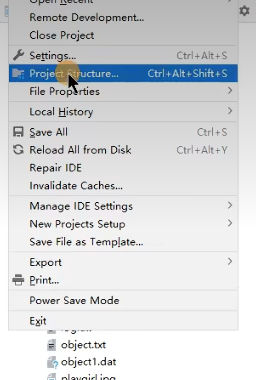
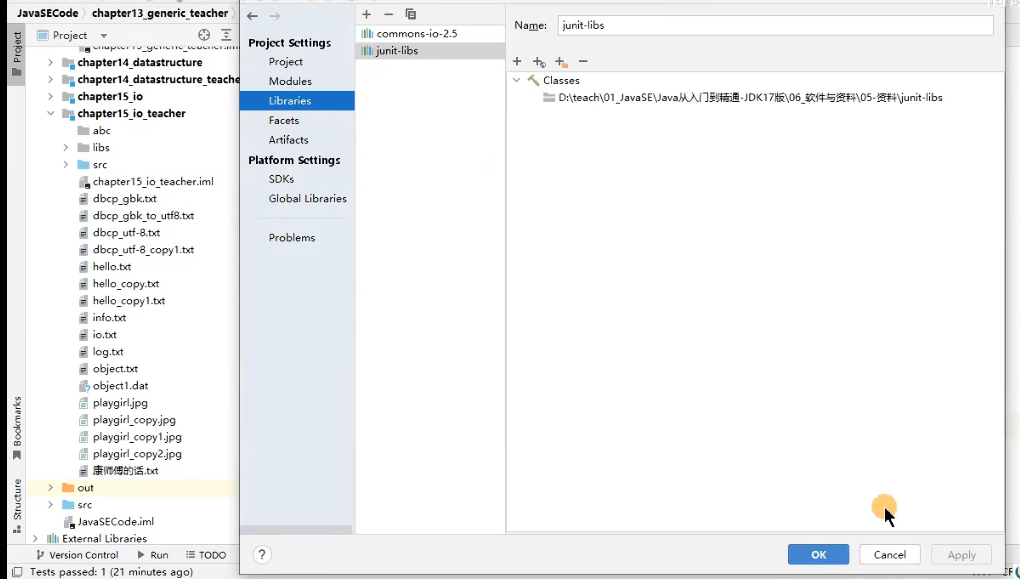
引入 jar 包
- jar 包放在 libs 目录下 “Add as Library”
- 添加进 Libraries
import java.io.File;
import java.io.IOException;
import org.apache.commons.io.FileUtils;

public class FileCopyExample {
    public void test5() throws IOException {
        // 赋值一个图片
        File srcFile = new File("playgirl.jpg");
        File destFile = new File("playgirl_copy2.jpg");

        // 使用 FileUtils 进行文件复制
        FileUtils.copyFile(srcFile, destFile);
        System.out.println("复制成功");
    }
}
File 类的使用
File 类的一个实例对应着磁盘上的一个文件或目录 -->万事万物皆对象
File 的实例化,常用方法
File 类中只有新建,删除,获取路径等方法,不包含读写文件的方法,此时需要使用 IO 流
IO 流的概述
- IO 流的分类
- 流向 输入流,输出流
- 处理数据单位 字节流,字符流
- 流的角色 节点流,处理流
- IO 的 4 个基类 inputStream 、OutputStrram `、Reader 、Writer
节点流之 文件流
- FileInputStream 、 FileOutputStream 、 FileRader 、 FileWriter
- (掌握)读写数据的过程
- 步骤一 创建 File 类的对象 、 作为读取或写出数据的端点
- 步骤二 创建相关流的对象
- 读取,写出数据的过程
- 关闭流资源
处理流之 缓冲流
- BufferedInputStream 、BufferedOutputStream 、 BuffereRader 、 BufferedWriter
- 作用:实现更高效的读写数据的操作
处理流二 转换流
- 层次一 属性转换流的使用
- InputStreamRader 、 OutputStreamWriter
- 层次二 (掌握) 字符的编码和解码过程,常用字符集
- 解决相关问题 读写时字符出现乱码 本质是使用的编码集与解码集不一致
处理流 三 对象流
- 层次一 熟悉对象流的使用
- ObjectInputStream 反序列化时需要使用 api
- ObjectOutStream 序列化时需要使用的 api
- 层次二 对象的序列化机制
- 使用场景 不同的进程间通信,客户端与服务器传输数据
- 自定义类要想实现序列化机制需要满足的要求及注意点
其它流的使用
- 了解 数据流 DataInputStream 、 DataOutputStream
- 了解 标准的输入流 、 标准的输出流 、 System.in 、 System.out
- 了解 打印流 PrintStream、PrintWriter
1.谈谈Javal0里面的常用类
字符流(银*数据)
学卫玩,
略
2.Java 中有几种类型的流?JDK为每种类型的流提供一些抽象类以供继承,请说出他们分别是
哪些类?(上海“厦联网、极科技)
InputStream OutputStream \ Reader \ Writer
3.流一般需不需要关闭?如果关闭的话用什么方法?处理流是怎么关闭的?(银*数据)
需要。close()
处理流在关闭过程中,也会关闭内部的流。
4.0utputstream里面的write()是什么意思?(君*科技)
数据写出的意思。
2.2 缓冲流
1.BufferedReader属于哪种流?他主要是用来做什么的?(国*电网)
略
2.什么是缓冲区?有什么作用?(北京中油**)
内部提供了一个数组,将读取或要写出的数据,现在此数组中缓存。达到一定程度时,
集中性的写出。
作用:减少与磁盘的交互,进而提升读写效率。
2.3 转换流
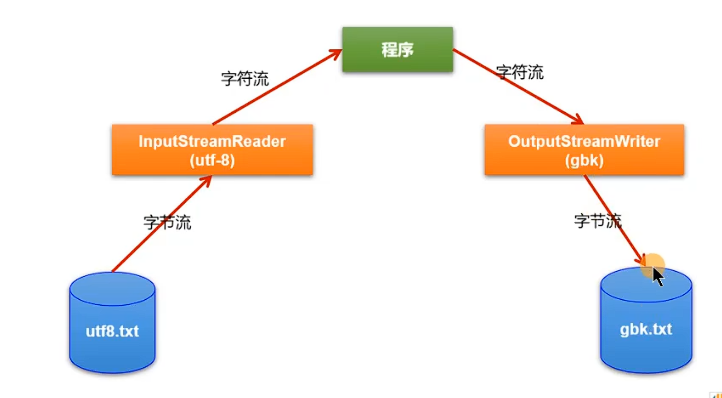
1.字节流和字符流是什么?怎么转换?(北京蓝*、海供应链管理)
2.4 序列化
1.什么是Java序列化,如何实现(君科技、上海厦物联网)
对象序列化机制允许把内存中的Java对象转换成平台无关的二进制流,从而允许把这种二进制流持久地保存在磁盘上,
或通过网络将这种二进制流传输到另一个网络节点。//当其它程序获取了这种二进制流,就可以恢复成原来的Java对象。
2.Java有些类中为什么需要实现Serializable接口?(阿*校招)
便于此类的对象实现序列化操作。